Invert Image Colors
This free color inverter turns any picture into its negative: black becomes white, white becomes black, and every color becomes its opposite. Choose a photo above and you'll see it inverted straight away, then download it as a JPG or PNG. It all happens in your browser, so your photo is never uploaded.
Negative or Brightness Only?
The editor can invert an image in two ways:

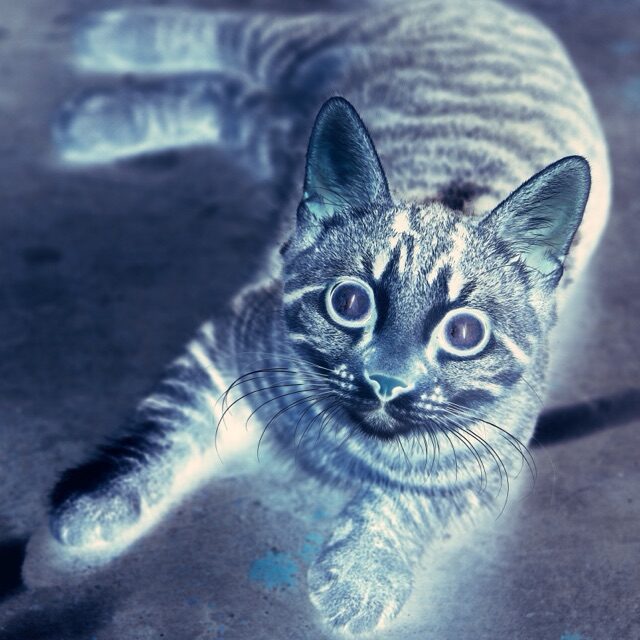

- Negative inverts everything, like an old film negative. Each color turns into the one opposite it on the color wheel: red becomes cyan, green becomes magenta, and the tabby's brown fur turns blue. This is what "invert colors" usually means.
- Brightness only swaps light and dark but keeps each color's hue. Dark blue turns light blue instead of orange, and skin stays a skin tone. Use it to turn a screenshot, chart or diagram with a white background into a dark one (or the other way round) without its colors going strange.
How to Invert the Colors of an Image
- Scroll up and choose your image, or drag and drop it onto the upload button. You can also try one of the sample cats.
- Pick Negative or Brightness only. The preview updates as you switch.
- Click Done, then download your image as a JPG or PNG.
Inverting is its own undo: invert the result again and you get your original image back. Transparent parts of a PNG stay transparent.
What People Invert Images For
- Dark mode screenshots and diagrams. A bright white screenshot looks out of place in a dark document or slide. Invert its brightness to get light text on a dark background.
- Black text on white, from white on black. A photo of a whiteboard or chalkboard, a logo on a dark background, or a scan that came out reversed: invert it to get the usual dark-on-light. To clean it up further, make it pure black and white.
- Previewing film negatives. Photograph a negative against a bright window or a phone screen showing white, then invert it to see the picture. Black and white film comes out right straight away. Color film has an orange tint, so the result will look blue: it's fine for seeing what's on the film, but not a proper scan.
- Art and effects. Negatives make striking, ghostly portraits and X-ray looks. Try adjusting the brightness and contrast afterwards.
How Does Inverting Work?
Every pixel on a screen is a mix of red, green and blue light, each from 0 to 255. A negative replaces each value with 255 minus it: a pixel that was full red and no blue becomes no red and full blue. That's why opposite colors swap.
Brightness only works differently: it measures how light each pixel is, flips that, and moves all three values up or down by the same amount, so the balance between them, the color, stays the same.
Private by Design
Your photo stays on your device: inverting runs in your browser, with no upload, no account and no watermark. When you're done, you can crop or resize the result on the next page.