Golden Ratio Overlay for Photos
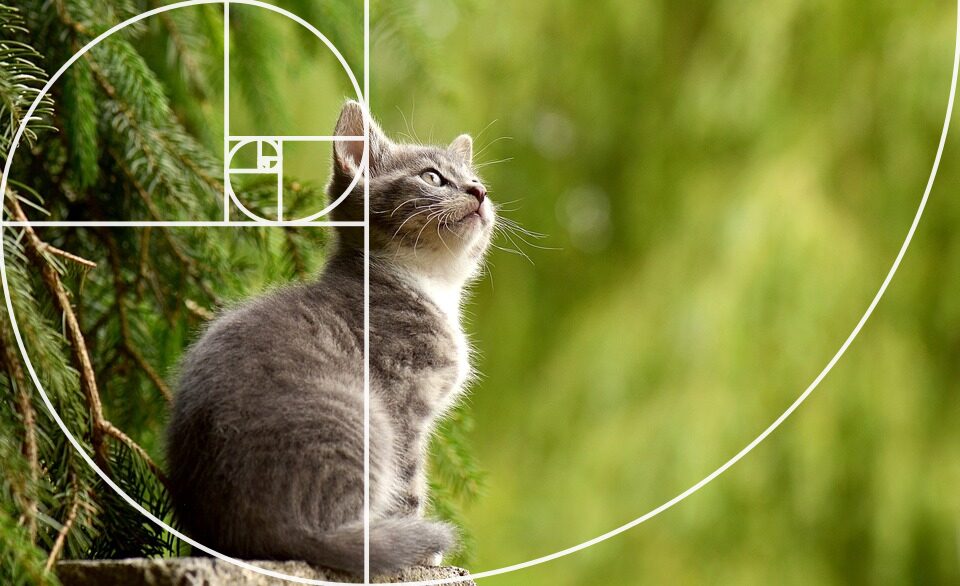
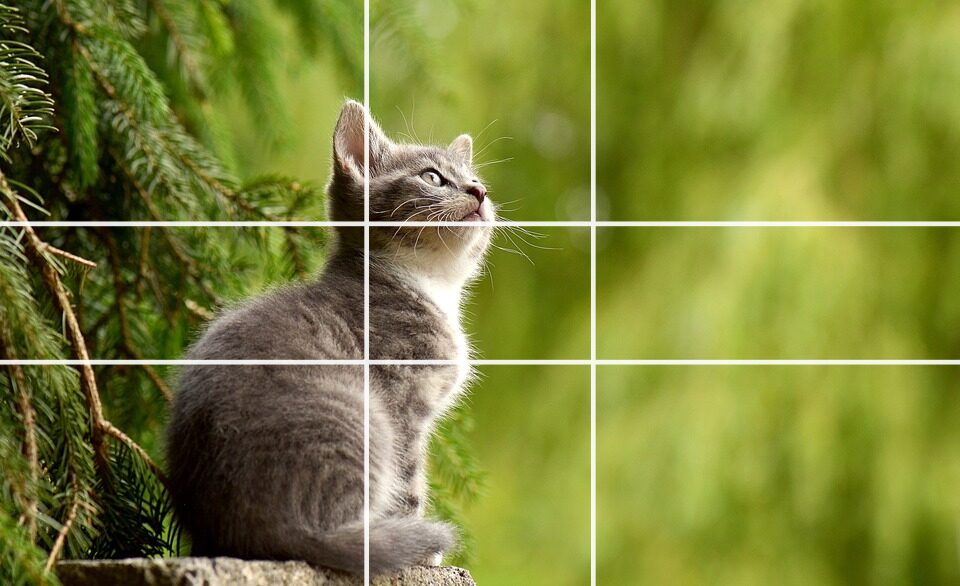
This golden ratio overlay draws a golden spiral or a phi grid over your photo, so you can see how its composition lines up. Choose a photo above, flip the spiral until it fits your subject, and download the result as a JPG or PNG. It all runs in your browser: your photo isn't uploaded anywhere.

How to Use It
- Pick a photo at the top of this page, or drop one there.
- Choose Spiral or Phi Grid.
- For the spiral, use Flip Across and Flip Down to move its tight end to any of the four corners of the frame: put it where your subject is.
- Pick a line color that stands out against the photo (white on dark scenes, black on bright ones) and a line width.
- Press "Done" to download the photo with the overlay on it.
The overlay is stretched to fit your photo, whatever its shape, the same way the crop overlays in Lightroom and other photo editors do. On a portrait photo the spiral runs down the long side.
A stretched spiral isn't strictly golden, though: on a 4:3 or 16:9 photo its quarter circles become ovals. Turn Stretch off to draw a true golden spiral instead, in the largest golden rectangle that fits in the middle of your photo. Its outline shows what a crop to golden proportions would keep.
What Is the Golden Ratio?
The golden ratio, written φ (phi), is about 1.618. Split a line so that the whole is to the longer part as the longer part is to the shorter one, and that ratio is φ. Artists and architects have used it for centuries, and photographers borrow it as a guide for where to put the subject, the horizon and other strong lines.
A rectangle whose sides are in the golden ratio has a neat property: cut a square off one end, and what's left is another golden rectangle. Keep cutting and draw a quarter circle in each square, and you get the golden spiral (also called the Fibonacci spiral, since the Fibonacci numbers approach the same ratio). That's what the Spiral overlay draws, squares and all.
Golden Spiral or Phi Grid?
The golden spiral is good for photos with movement or a sense of flow: a road, a river, a curving shoreline, a person's gaze. The eye follows the curve from the wide end into the tight end, so that's where your subject should be. In the example, the spiral sweeps around the open background and curls in near the kitten's head.
The phi grid divides the frame at 0.382 and 0.618 of the way across and down, instead of at thirds. It looks like the rule of thirds, but its lines sit a little closer to the middle. Put your subject on one of the four crossings, and horizons and edges along the lines. In the example, the kitten's head sits right on the top left crossing.
Golden Ratio vs. the Rule of Thirds
The rule of thirds splits the frame into three equal parts each way; the phi grid splits it 38% / 24% / 38%. The difference is small, and neither one is a law: they're both ways to move the subject off center so the picture feels balanced instead of static. For a rule of thirds grid, use our rule of thirds overlay; for any other number of rows and columns, the grid overlay.
Fixing the Composition
If the subject is off the spiral or the grid lines, you can often fix it by cropping. Look at where the subject should move to, then crop the photo and check it again with the overlay. To keep the photo's golden proportions, crop to about 1.618 by 1 (a 3:2 photo, from most cameras, is already close).